
Internet Guide for Playa del Carmen – 2026

Internet in Playa del Carmen can be excellent—fast enough for cloud work, 4K streaming, large uploads and a household full of connected devices—but choosing a provider by brand name alone is one of the easiest mistakes a newcomer can make. Telmex, Totalplay and izzi all serve the broader Playa market, yet the connection available in one condo can be completely different from what is available across the street. For anyone whose income depends on staying online, the real questions are not simply “Who advertises the most megabits?” but whether fiber reaches the actual unit, what upload speed you receive, how the building handles installations, and what happens when the electricity or primary connection goes down.
What this guide covers: Telmex, Totalplay and izzi; fiber availability; download versus upload speeds; reliability; installation; condo restrictions; Wi-Fi problems; power interruptions; customer support; and backup internet.
Why it matters: Playa has become a serious remote-work city, but broadband quality is extremely building-specific. A 500 Mbps advertisement means very little if the condominium has no fiber path to your unit, the router sits behind three concrete walls, or your only connection disappears during a power interruption.
Who this is for: Digital nomads, remote employees, business owners, permanent residents, snowbirds, condo buyers and landlords who need dependable home internet rather than occasional vacation Wi-Fi.
Current context: Provider packages and promotions change frequently. The useful comparison is therefore based primarily on technology, upload capability, infrastructure, installation and actual building availability rather than on a temporary promotional price.
1. The Reality of Internet in Playa del Carmen
Playa del Carmen no longer has the sort of internet environment where remote workers should assume that merely being in Mexico means tolerating slow connections. Residential broadband packages measured in hundreds of megabits are normal, fiber networks have expanded significantly, and gigabit-level plans exist in the Mexican residential market. For most routine remote work, the available bandwidth is far greater than the actual requirement.
The catch is that broadband in Playa is extremely local. The same provider can be an excellent choice in one development and a mediocre choice a few blocks away. A modern building may already have fiber from two companies routed into a telecommunications room, while an older building may have one provider using older infrastructure and a second provider unable to install because there is no usable conduit.
This is why the standard question—“Is Telmex or Totalplay better?”—does not have a universal Playa answer.
Your building matters more than your neighborhood
Neighborhood still matters because providers expand infrastructure geographically, but the individual building is the more important unit of comparison. Two condos on Calle 38 may share similar rents, similar views and the same postal code while offering completely different internet choices.
A provider may show service available at the street address but discover during installation that the condominium’s internal telecommunications path is blocked. Conversely, a building may have multiple fiber providers already serving dozens of residents, making a new installation unusually easy.
Before asking Facebook which internet company is best in Playa, ask three people who live in the exact building you are considering. Their answer is dramatically more useful because they share the same utility rooms, conduits and last-mile infrastructure.
For ordinary internet use, headline speed has become less important
A household with 120–150 Mbps of stable broadband already has enough bandwidth for multiple video calls, streaming, browsing and ordinary cloud work. Moving from 150 Mbps to 500 Mbps can make large downloads faster, but it does not automatically make Zoom more reliable or eliminate Wi-Fi dead zones.
Remote workers should therefore prioritize connection type, upload speed, latency, stability and redundancy before paying for the largest number on a sales page.
2. Fiber Availability: The Question to Ask Before Anything Else
The most important internet question in Playa is not “How many megas?” It is “Is this connection actually fiber to the home?” Fiber-optic infrastructure carries data using light rather than electrical signals running over older copper or coaxial networks. In residential use, that can support high bandwidth and strong upload performance with less dependence on legacy copper infrastructure.
But the word fiber is used loosely in telecom marketing. A provider may have fiber in its broader network while another medium completes part of the final connection. For a remote worker, what matters is what physically reaches the residence.
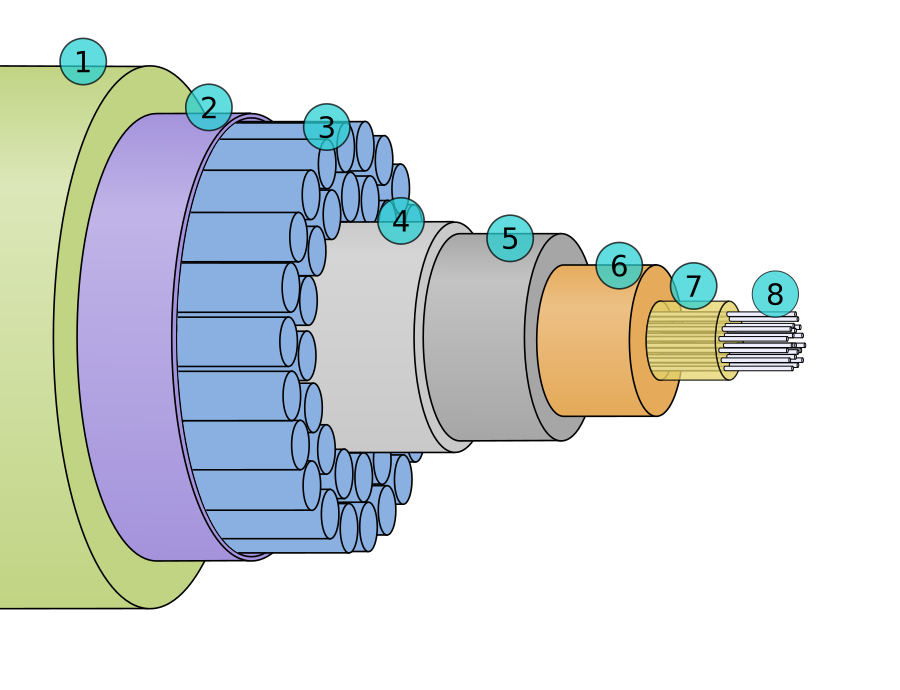
Fiber to the building is not necessarily fiber to your unit
A condominium can advertise “fiber internet available” while the final internal connection varies. In a newer development, individual fiber drops may run directly from the telecom room into each condo. In another building, the incoming network may transition to older internal cabling.
If internet matters professionally, ask the provider or building administrator what actually enters the unit. Look at the installed equipment. A fiber installation commonly terminates in an optical network terminal or integrated fiber gateway rather than simply connecting an old telephone cable to a conventional DSL modem.
Availability checkers are only the first step
All three major providers allow customers to check service availability when ordering. That is useful, but an online system cannot always understand the internal politics and physical condition of a condominium.
The address may appear serviceable because the provider has infrastructure on the street. The technician can still arrive and discover that the building does not allow new exterior cable, the conduit is full, the fiber distribution box has no available port or administration has not authorized access to the telecom room.
For detached houses, the problem is usually simpler because there is no condominium administration between the provider and the customer. In dense downtown developments, building access becomes part of the installation.
Ask: “Which companies currently have fiber connected to apartments in this building?” That is a better question than “Does the building have internet?” If possible, ask for the provider name used by the previous tenant and a photo of the existing modem or ONT.
Do not confuse the landlord’s Wi-Fi with the building’s internet capability
A furnished apartment may include a mediocre 50 Mbps connection because the owner never upgraded the package. That does not necessarily mean the building is limited to 50 Mbps. The infrastructure may support substantially faster service.
The opposite is also possible. A listing may promise “500 mega Wi-Fi” because that is what the owner pays for, while actual wireless performance in the bedroom is 60 Mbps because the router is hidden in a utility cabinet at the opposite end of the condo.
Those are two different problems. One is the internet connection coming into the residence. The other is the local network distributing that connection inside the residence.
3. Telmex vs. Totalplay vs. izzi
Telmex, Totalplay and izzi all compete for Mexican residential internet customers, but they come from different network histories and should not be treated as interchangeable logos. The practical comparison in Playa starts with the technology available at your exact address.
Telmex Infinitum
Telmex is the longstanding national telecommunications provider and its Infinitum service has an enormous footprint across Mexico. The important distinction is whether the address receives modern Telmex fiber rather than an older copper-based service.
For remote workers, current Telmex fiber packages are particularly interesting because lower and midrange fiber tiers can provide strong upload performance. Telmex has expanded symmetric or near-symmetric upload/download offerings on qualifying fiber services, while its highest residential tiers can use lower upload limits than their headline download speeds.
That means someone choosing Telmex should not simply buy the fastest download plan. A person regularly transferring large video files should compare the advertised upload figure on the exact plan.
Where Telmex can be strong
Telmex’s broad physical footprint is valuable. In buildings where fiber is already installed and functioning well, it can be a very straightforward choice. Long-established buildings may also already have Telmex pathways and equipment even when a newer competitor has difficulty getting permission to install.
For residents moving from unit to unit, that legacy presence can sometimes make Telmex the path of least resistance.
Where Telmex can disappoint
The brand name tells you almost nothing if the address is still served through older infrastructure. A Telmex fiber connection and an old Telmex copper connection should not be evaluated as though they were the same product.
If the provider cannot offer fiber at the address and Totalplay can, the comparison changes immediately for a remote worker.
Ask specifically whether the service offered to the unit is fibra óptica. Do not assume that choosing Telmex automatically means choosing fiber.
Totalplay
Totalplay built much of its reputation around fiber-based residential internet and continues to market its home network as 100% fiber optic. Its residential offering also emphasizes symmetric internet on qualifying packages, an important feature for home offices.
For people who spend their day in video conferences, synchronize large folders with cloud storage, upload media or remotely access corporate systems, strong upstream capacity is more valuable than many consumers realize.
Totalplay is therefore often high on the shortlist when it has established infrastructure inside the building.
Why some remote workers gravitate toward Totalplay
At the national level, independent fixed-broadband benchmarking has previously rated Totalplay strongly for consistency and overall broadband experience. That does not prove that Totalplay is the best provider in a particular Playa condominium, but it explains part of the provider’s reputation among heavy internet users.
Its main practical limitation is coverage. A strong service that cannot physically be installed in your unit is irrelevant. In Playa’s condominium market, that can come down to a surprisingly mundane question: is there already a Totalplay fiber box in the building?
izzi
izzi is another major national provider with packages reaching from entry-level broadband through gigabit-class internet. Its network history includes cable infrastructure, and the exact technology reaching a property can matter more than the package label.
In a building where izzi has been operating successfully for years, it can be a perfectly reasonable choice. Current residential plans reach up to 1,000 Mbps in the wider Mexican market, and izzi provides online availability checks and scheduled installation options.
The caution for remote workers is upload performance. Do not infer upload speed from the download number. Ask explicitly what upload speed is included with the plan available at your address.
Do not reject izzi simply because another company says “fiber” more loudly
A stable 200 Mbps connection already installed in a well-managed building may be more useful than chasing a theoretically superior provider whose technician cannot get a cable into the condo. Existing infrastructure has real value.
If a neighbor on your floor has used izzi for two years without repeated problems, that evidence should be part of the decision.
| Factor | Telmex | Totalplay | izzi |
|---|---|---|---|
| Best case | Existing fiber connection with strong upload | Fiber installed directly in the building | Established building service with good local performance |
| Main thing to verify | Fiber versus older infrastructure | Actual address/building availability | Connection technology and upload speed |
| Remote-work appeal | Strong when fiber is available | Strong because fiber and symmetric service are central to the offer | Potentially good, but evaluate the exact plan and building |
| Wrong way to choose | Assuming all Telmex connections are equivalent | Assuming advertised coverage guarantees condo access | Assuming download speed tells you upload speed |
4. Upload Speed, Video Calls and Remote Work
Download speed receives most of the advertising because consumers understand it easily. Bigger sounds better. But remote work is increasingly a two-way activity, and upload speed deserves equal attention.
Every time you send video during a Zoom or Teams call, upload files to Google Drive, synchronize Dropbox, back up photographs to the cloud, publish a video, operate a security camera or send project files to a client, you are using upstream capacity.
Why 500 Mbps down and 20 Mbps up is not the same as 200/200
For watching Netflix, the first connection may appear more impressive. For a household containing two remote workers, cloud backups and several security cameras, the second connection can be considerably more balanced.
A large upload can saturate a weak upstream connection and affect everything else using the internet. Someone uploading gigabytes of video while another person is in a client call can create latency and instability even though the advertised download speed looks enormous.
How much upload speed do you actually need?
A single remote employee doing email, web applications and ordinary HD video calls does not need 300 Mbps upload speed. A stable connection with a few tens of megabits upstream can already handle normal office activity comfortably.
The requirement rises when several people work simultaneously or when the job involves media production, design assets, software images, remote servers or large cloud folders. The intelligent approach is to buy enough capacity for the workload plus margin rather than treating the highest possible package as a status symbol.
Latency matters too
Speed tests show more than download and upload. Pay attention to ping or latency. A connection can deliver impressive throughput while still feeling sluggish in real-time applications if latency becomes high or inconsistent.
Remote desktop applications, online gaming, VoIP calls and interactive corporate systems are particularly sensitive to latency. For these workloads, stable fiber and a wired Ethernet connection are often more valuable than another few hundred megabits of theoretical download speed.
A stable 150/150 Mbps fiber connection connected to your computer by Ethernet can be a better professional tool than “1 gig Wi-Fi” reaching your desk through three concrete walls.
5. Installation and Condo Restrictions
Signing up for internet in a detached house is mainly a transaction between you and the provider. Signing up in a Playa condominium can become a three-way negotiation among you, the ISP and the building administration.
That difference should not be underestimated.
The technician needs physical access
A fiber installer may need access to a central telecommunications room, rooftop pathway, utility shaft, hallway cabinet or exterior distribution point. Those spaces may be locked. Security may not have authorization to open them.
If a technician arrives at 10:00 a.m. but the administrator with the key does not arrive until 3:00 p.m., the installer may simply leave and reschedule.
Before installation day, tell administration which company is coming and ask exactly where the technician needs to connect.
Some buildings restrict visible cable
Downtown Playa is full of new condominium developments that care about façade appearance. Management may prohibit technicians from running black fiber cable across an exterior wall or drilling wherever it is easiest.
This can be reasonable from an architectural perspective but frustrating if the building never installed adequate internal conduit.
Ask whether the provider is already approved. If other residents use the same company, the physical path has probably already been solved.
There may be no room left in the conduit
This is a surprisingly ordinary reason for an installation problem. Buildings accumulate telecommunications cables over time. Old cables remain in place after customers cancel service. Eventually the conduit intended to carry them becomes crowded.
A new provider can reach the building yet still struggle to reach your apartment.
Which ISPs currently serve individual units, and are there active fiber drops into the apartment you are buying? High-speed internet should be part of due diligence for any property marketed to remote workers or vacation-rental guests.
Installation can involve drilling
If the unit has never had that provider, the technician may need to drill a small penetration to bring the cable inside. Renters should not authorize permanent modifications without the owner’s permission.
Do not assume the technician will place the modem exactly where you want it. The easiest cable route may end in a bedroom or utility area. If Wi-Fi coverage matters, discuss equipment placement before the holes are drilled.
Think about the router location before installation starts
A router placed at one extreme end of a long condo will create unnecessary Wi-Fi problems. If you have a home office, identify the office location first. Ideally, the main equipment should be reasonably central or you should plan an Ethernet run or mesh system.
For serious remote work, a small amount of installation planning can matter more than upgrading the internet plan.
- Confirm the provider serves the exact unit, not simply the street.
- Ask administration whether the ISP is approved.
- Arrange access to telecommunications rooms before the technician arrives.
- Ask whether an existing conduit or fiber drop reaches the unit.
- Get landlord permission before drilling.
- Choose router/ONT placement based on the home office rather than convenience for the installer.
- Test the connection before the technician leaves.
- Run both a Wi-Fi test and an Ethernet test when possible.
- Save the account number, installation paperwork and support contact information.
6. Why Fast Internet Can Still Produce Bad Wi-Fi
This is probably the most misunderstood internet problem in Playa condos. The internet service and Wi-Fi are not the same thing.
Your ISP can deliver 500 Mbps perfectly to the modem while your laptop receives 70 Mbps in another room. Calling the provider and demanding a faster package does not solve the underlying issue.

Concrete is the enemy of perfect Wi-Fi
Playa construction relies heavily on concrete and masonry. These materials are excellent for many purposes but are much less friendly to wireless signals than lightweight interior walls.
A router tucked behind a television in the living room may perform beautifully there and poorly in a bedroom separated by several walls.
Large mirrors, appliances, metal doors and dense neighboring Wi-Fi networks can make the situation worse.
2.4 GHz versus 5 GHz
Modern routers commonly provide both 2.4 GHz and 5 GHz Wi-Fi bands. In simplified terms, 2.4 GHz generally reaches farther and passes through obstacles better, while 5 GHz can provide higher performance over shorter distances.
If your home office is far from the router, the fastest theoretical wireless band may not be the one providing the most stable connection at the desk.
Mesh systems are often better than simple extenders
A larger condo or townhouse can benefit from multiple coordinated access points. A mesh system places additional units around the property so devices can connect through a closer node.
For the best performance, wired backhaul between access points is preferable when the property allows it. Purely wireless mesh is still useful, but every design depends on placement and building construction.
Ethernet remains the remote worker’s friend
A wired Ethernet connection eliminates most of the uncertainty between the computer and router. If your desk never moves, there is little reason for the most critical workstation to depend exclusively on Wi-Fi.
Ethernet also makes troubleshooting easier. If the wired connection tests at 300 Mbps while Wi-Fi tests at 40 Mbps, you know the ISP connection itself is probably not the bottleneck.
When diagnosing a slow connection, test by Ethernet directly from the router or gateway first. Then test Wi-Fi from the normal working position. The difference tells you whether you have an ISP problem or a home-network problem.
7. Reliability, Outages and Power Problems
People often ask for a reliability ranking—Telmex first, Totalplay second, izzi third, or some other permanent order. That is not particularly useful in Playa because failure can occur at several levels.
The ISP can have a network outage. Construction crews can damage fiber. A local distribution box can fail. The building’s internal telecom infrastructure can have a problem. And the most common issue during a broader electrical interruption is simpler: your modem and router have no electricity.
Ask neighbors about actual outages
When evaluating a building, ask residents how often the internet fails and how long repairs normally take. Ask whether outages affect the entire provider or only particular units.
If three neighbors using Totalplay say they have had no significant interruption in a year, that is strong local evidence. If three Telmex customers complain of repeated outages from the same building, that is more relevant than somebody’s excellent Telmex experience in another state.
Playa construction can create physical-network risks
The city is constantly changing. Streets are opened, properties are demolished, utility work occurs and new developments connect to existing infrastructure. Physical cables occasionally become collateral damage.
This is another reason redundancy matters for people whose jobs cannot tolerate downtime.
Power failure is an internet failure unless you prepare for it
Fiber itself does not magically power the equipment in your apartment. Your ONT, gateway and Wi-Fi router require electricity. A neighborhood power outage can therefore take you offline even if the provider’s network remains functional.
A small uninterruptible power supply—UPS—can keep the modem, fiber terminal and router powered during short outages. The required battery size depends on the equipment and how long you want it to operate.
For remote workers, this is one of the highest-value upgrades in a Playa home office.
A UPS only solves your side of the power problem. If the provider’s upstream equipment also loses power or the outage damages network infrastructure, your home battery cannot restore the ISP. That is why a cellular backup remains important.
Restarting the router is useful—but not a diagnosis
Power cycling can clear certain equipment problems, but residents sometimes reboot everything repeatedly when the entire neighborhood is offline.
Check the provider app or support channel. Ask a neighbor using the same ISP. Look at the status lights on the optical terminal or modem. If the device indicates loss of optical signal, restarting your laptop is unlikely to accomplish anything.
Customer support experience varies
All major providers maintain phone, app or digital support channels. The practical experience depends on the problem. Remote troubleshooting is fast when a modem needs reprovisioning; a damaged fiber line requires a technician.
Keep the account number somewhere accessible. Renters should also know whose name appears on the account because a provider may require the account holder to authorize certain changes.
8. Backup Internet for People Who Cannot Go Offline
If losing internet for two hours is merely annoying, you probably do not need an elaborate backup strategy. If losing internet means missing a client presentation, being unable to trade, losing access to a company system or cancelling paid consultations, redundancy should be part of your housing budget.
Backup level one: mobile hotspot
The simplest backup is a Mexican mobile plan with enough data for hotspot use. Telcel and AT&T are common choices, while additional mobile operators also serve the market.
Test mobile reception inside the actual condo. A phone showing excellent 5G on Quinta Avenida tells you nothing about reception at a desk surrounded by reinforced concrete on the fifth floor of another neighborhood.
Run a hotspot speed test from the chair where you work.
Do not use the same physical network as your only backup if you can avoid it
A second fixed internet account can provide excellent redundancy, but only if the two services fail independently enough to justify the cost. If both companies’ cables enter the property along the same vulnerable path, one construction accident could theoretically affect both.
For most home workers, fixed broadband plus cellular is the simplest practical diversity.
Backup level two: a dedicated cellular router
A cellular router can remain permanently connected to the backup mobile network instead of requiring you to enable a phone hotspot during an emergency. Some routers support automatic failover: when the primary wired connection stops responding, traffic moves to mobile data.
For consultants, developers, financial workers and business owners, this can be more professional than trying to configure a hotspot while a client waits on Zoom.
Backup level three: a second fixed-line provider
Some residents who absolutely require connectivity pay for two home internet services. This is easier in buildings that already allow multiple providers.
The strategy makes sense when the financial cost of downtime exceeds the second monthly bill. It makes much less sense for someone whose main online activity is Netflix.
Coworking should be part of the disaster plan
A serious remote worker should know where they can physically relocate if the problem lasts all day. A coworking space, office, hotel business center or other known workspace can be the final layer of redundancy.
Do not wait until the outage to begin searching. Identify one location in advance, understand its hours and know whether it has suitable space for calls.
Hurricane preparation is different
A major tropical-weather event can disrupt electricity, telecom infrastructure and mobile networks simultaneously. No residential backup setup guarantees normal internet during a severe hurricane.
The sensible objective is continuity through ordinary short outages and minor infrastructure problems. For major storms, remote workers should follow official safety guidance first and plan work obligations around the possibility that communications may be disrupted.
- Primary fiber internet where technically available.
- Ethernet connection for the main workstation.
- UPS powering the ONT/modem and router.
- Mexican mobile plan with hotspot capability.
- Hotspot tested from the actual home-office location.
- Important files available offline when practical.
- Power bank for the phone.
- Known coworking or alternate work location.
- Provider account and support information saved locally.
9. Which Internet Provider Should You Choose?
The useful answer is not to crown one company the permanent winner. Internet in Playa should be selected using a hierarchy of questions.
First: who has fiber in the building?
If only one provider can deliver genuine fiber to the unit, that company deserves immediate consideration. The other providers’ national advertisements are irrelevant.
If both Telmex and Totalplay already have fiber infrastructure in the building, you have a much better comparison. Ask neighbors about recent performance, compare upload speeds and examine current terms.
If izzi has a well-established connection in the building but competitors require a complicated new cable installation, do not dismiss the value of infrastructure that already works.
Second: what upload speed do you get?
For a family mainly streaming television, this may be secondary. For a remote worker, content creator or business owner, it can change the ranking completely.
Telmex fiber has increasingly emphasized strong upload speeds and symmetric service on many lower and midrange fiber packages. Totalplay prominently markets symmetric internet in its residential fiber offer. With izzi, verify the upload specification attached to the exact package and technology available at the residence rather than assuming it matches the download figure.
Third: what do people in the building report?
Talk to actual users. Ask a useful question rather than “Do you like it?”
Ask how many outages they had in the past six months. Ask whether speeds fall substantially at certain times. Ask how long technician visits take. Ask whether they work from home.
A retired neighbor who watches YouTube occasionally may judge reliability differently from a software developer running eight hours of calls and remote sessions.
Find a neighbor who works from home and ask which provider they use. If possible, ask to see a current wired speed test. That single piece of building-specific evidence can be more valuable than dozens of generic online reviews.
Fourth: inspect the apartment network
Even the right provider can be ruined by poor router placement. If you are renting a furnished apartment, test from the desk where you intend to work rather than standing beside the modem.
Run one test over Wi-Fi and, if possible, another by Ethernet. If wired speed is excellent but the office is poor, the solution may be a mesh access point or Ethernet cable rather than changing providers.
Fifth: build the backup before you need it
Remote workers often treat backup internet as something to configure after the first failure. That is exactly the wrong time.
Test the mobile hotspot during an ordinary workday. Connect the UPS. Learn how long the network hardware runs on battery. Save the support numbers.
Redundancy that has never been tested is only a theory.
| Type of User | What Matters Most | Best Strategy |
|---|---|---|
| Casual resident | Price and adequate download speed | Choose whichever established provider works reliably in the building. |
| Remote employee | Fiber, upload, latency and mobile backup | Telmex fiber or Totalplay fiber are strong candidates where available; verify building performance. |
| Content creator | High sustained upload capacity | Compare actual upstream specifications before comparing download tiers. |
| Business-critical worker | Redundancy | Fiber + cellular failover + UPS, potentially two fixed providers. |
| Short-term renter | What is already installed | Speed-test before booking or immediately after arrival; changing providers may not be worth the effort. |
So is Telmex or Totalplay better?
If both deliver fiber directly to the same Playa condo, the comparison is genuinely competitive. Totalplay’s fiber-first network and symmetric-service positioning make it especially appealing to remote workers. Telmex fiber can also provide excellent upstream performance and has the advantage of a huge established national network.
The important phrase is Telmex fiber. Comparing Totalplay fiber against an older Telmex copper connection is not a fair brand comparison; it is a comparison between network technologies.
Likewise, a resident should not choose Totalplay simply because a national benchmark or friend in Mexico City likes it. If the Playa building has an awkward Totalplay installation but a proven Telmex fiber drop into the unit, Telmex may be the obvious answer.
Where does izzi fit?
izzi makes the most sense when it already has good infrastructure in the building, offers sufficient upload for your workload and receives positive reports from neighbors. It can also be appealing when bundling television or other services matters to the household.
Remote workers should simply be more deliberate about checking the upstream specification and connection technology rather than focusing on the headline download number.
What should a digital nomad ask an Airbnb host?
Do not ask, “Is the Wi-Fi good?” Almost every host will answer yes.
Ask for the provider name and a recent speed-test screenshot taken inside the unit. Better yet, ask whether the test was taken from the working area rather than beside the router. If you need Ethernet, ask whether a wired connection is accessible.
If your work requires frequent video meetings, mention that specifically. “Fast enough for Netflix” is not a professional network specification.
“Could you send me a current speed test showing download, upload and ping from inside the apartment, preferably from the desk or dining table where someone would work?” That question produces information you can actually use.
What should a condo investor care about?
Internet infrastructure is increasingly part of rental competitiveness. A condo aimed at digital nomads or monthly renters should have real fiber availability, sensible router placement and a clear way to connect a workstation by Ethernet.
Owners often spend heavily on decorative furniture while leaving a low-end router inside a metal electrical cabinet. For a remote worker, that can matter more than the designer chairs.
If the unit is being renovated, add Ethernet cabling while walls are already open. Running cable from the network point to the bedroom and primary working area is inexpensive compared with trying to solve wireless problems later.
Internet quality should influence where remote workers rent
People evaluating Playa rentals often prioritize distance to the beach, rooftop pool, gym and balcony. Someone working forty hours per week from the condo should move internet infrastructure much higher on that list.
A spectacular apartment with unreliable connectivity becomes irritating quickly. A slightly less dramatic apartment with two fiber providers, excellent mobile reception and a sensible workspace can produce a much better three-month stay.
This is one of the ways long-term life in Playa differs from vacation logic. The best view is not always the most useful amenity.
Playa del Carmen can support serious remote work extremely well, but there is no citywide answer to whether Telmex, Totalplay or izzi is “best.” The decisive information exists at the building level. Find out which providers already have fiber inside the property, ask remote-working neighbors about reliability and compare actual upload speeds rather than simply choosing the package with the largest download number.
Where both are available as genuine fiber connections, Telmex and Totalplay should usually be high on a remote worker’s shortlist. Totalplay has built its residential offer heavily around fiber and symmetric internet, while Telmex fiber provides strong upload capability across much of its current package range and has an enormous established network footprint. izzi can be a very practical choice in buildings where its service is already established and reliable, but remote workers should verify the upstream speed and underlying connection technology attached to the specific plan.
Do not blame the ISP for every weak Wi-Fi signal. Playa’s concrete construction can turn an excellent connection into poor wireless performance several rooms away. Router placement, Ethernet cabling and mesh access points often matter more than upgrading from 300 Mbps to 1,000 Mbps. Test by Ethernet before concluding that the provider is slow.
Most importantly, anyone whose income depends on connectivity should assume that every provider will eventually have an outage. Use a UPS to keep the fiber terminal and router powered during short electrical interruptions, maintain a tested Mexican mobile hotspot, and know where you can work if the primary connection remains down. The best internet setup in Playa is not simply the fastest connection. It is a fast connection with a realistic backup.


